Getting Started
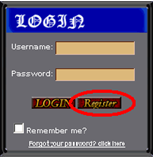 To play Race Conflicts you are required to create an account. You can create an account easily by clicking the Register Button on the left side of the main page.
1. Creating a Username
Your username is the name under which the players of the Race Conflicts will recognize you. This cannot be changed after you register so choose wisely.
2. Filling in your email and password
The e-mail address is required for registering, and within the next 30 min after registering you will receive a message that will announce that your account was created. You will also recieve a link to activate your account before starting to play. The password is for securing your account so no one will access the account but you.
3. Filling in Optional Information
Next you are requested to fill the required fields with your name, gender, birth date and country, this information is for statistic purposes only and is optional.
4. Read the Rules of Conduct and the ToS (Terms of Service)
If you are to play the game you MUST agree to the Terms of Service and the Rules of Conduct. Please read them before you start playing.
5. Activating your Account
Your membership information will be mailed to your email address. Please check it and follow the directions.
|